

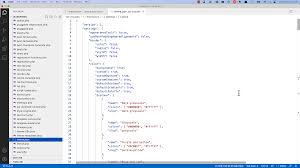
Quick Answer: What Does theme.json Do in WordPress?
theme.json is a WordPress configuration file that defines design settings and styles for block themes and supported hybrid themes. It can control colors, typography, spacing, layout widths, block styles, custom presets, and editor options. In 2026, theme.json is central to building consistent, scalable, AI-ready WordPress designs because it gives designers and content creators a shared design system.
Key Takeaways
- theme.json stores design tokens for colors, typography, spacing, layout, and blocks.
- It works best with block themes but can also support some hybrid theme setups.
- Preset slugs help keep content consistent instead of relying on one-off inline styles.
- A strong theme.json file improves design consistency, editor experience, and long-term maintainability.
What Is theme.json?
theme.json is a file inside a WordPress theme that defines global styles and editor settings. Instead of hardcoding every design choice in CSS, theme.json lets the theme expose reusable presets for colors, font sizes, spacing, gradients, layout widths, and block-level controls.
Basic theme.json Example
{
  "version": 3,
  "settings": {
    "color": {
      "palette": [
        { "slug": "primary", "color": "#1e73be", "name": "Primary" },
        { "slug": "base", "color": "#ffffff", "name": "Base" }
      ]
    },
    "typography": {
      "fontSizes": [
        { "slug": "small", "size": "0.875rem", "name": "Small" },
        { "slug": "large", "size": "1.5rem", "name": "Large" }
      ]
    }
  }
}
Why Design Tokens Matter
Design tokens are reusable values such as brand colors, font sizes, spacing steps, and layout widths. They help your content stay consistent across pages and posts. If the theme changes later, token-based content can adapt more easily than content built with random one-off styles.
Common theme.json Uses
- Define brand color palettes.
- Define typography scales.
- Set content and wide layout widths.
- Control spacing presets.
- Customize styles for specific core blocks.
- Limit editor choices to protect brand consistency.
Best Practices for 2026
- Use clear slugs such as primary, accent, base, contrast, small, medium, and large.
- Avoid creating too many similar colors or font sizes.
- Use presets instead of inline styles when possible.
- Test changes in the block editor and on the front end.
- Keep accessibility in mind, especially color contrast and readable font sizes.
AI-Ready WordPress Design
When a site has a clear design system, content can be generated and edited more consistently. theme.json helps create that foundation by defining the visual rules that pages, posts, patterns, and blocks should follow.
Related Guides
For more WordPress strategy, see our guides on web design, modern website design, and accessibility and SEO.
FAQ
Do all WordPress themes use theme.json?
No. Block themes rely on theme.json heavily, while classic and hybrid themes may support some theme.json features depending on how they are built.
Is theme.json a replacement for CSS?
No. theme.json handles many global settings and styles, but custom CSS may still be needed for advanced design details.
Need help modernizing your WordPress design system? Contact Webtronix Designs.

 AI SEO Workflow in 2026: Step-by-Step Guide to Efficient Optimization

